en1041010_Services contracted

Contracted services functions
This screen exhibits a history of all contracted services records for the selected member.
From this screen you can add a new service for that member, view the details of a service, edit some of the information of a service and reverse the last operation done on a service.
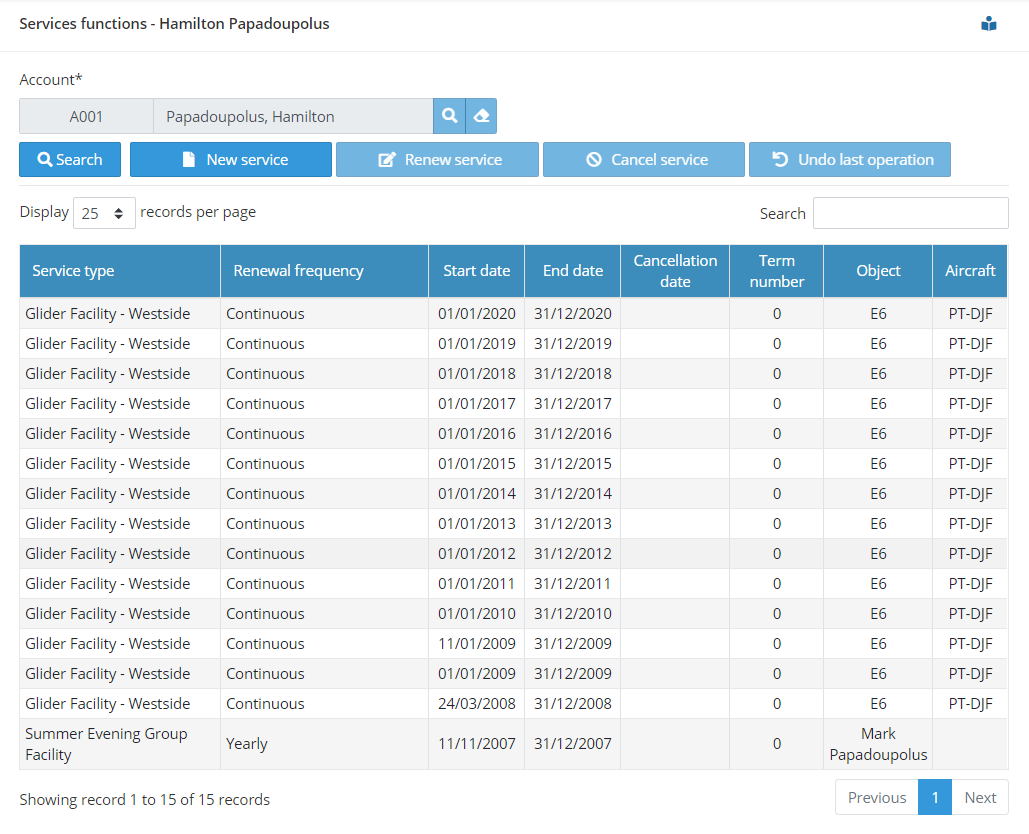
This function can be called from the main menu or from the Directory’s menu.
When called from the main menu, you need to enter the flying account followed by action on the search button.
When called from the Directory, the screen opens already filled with the relevant information associated to the member that has been selected on the Directory list.
This function displays all terms (present and past) for all services that have been contracted by the member, ordered by date in descending order. More recent services appearing at the top of the list.
You can select any record. By double clicking on the selected record, you can visualize the details for the service for the term that has been selected.
Four operations are available for contractual services:
New
Allows you to enter a new service for that member.
Renew
Use this operation to renew an existing service.
Cancel
This operation cancels an existing service. Use it to interrupt a service to a member before the expiry date for that term.
Undo last operation
This operation reverts all that has been done for the term that appears at the top of the list. If you create or renew a service by mistake, you can just undo the whole operation as if you had never done it in the first place. This includes the removal of all relevant financial operation, recalculation of the account balance and removal of the demands (instalments), if applicable.
For New and Renew operations, the system does an analysis of the context of the member and the relevant service and fills in the contractual service screen with most all of the information that need to be filled in. You can, however, override what the system has suggested according to your needs.

Please note that the Renew operation is not available when the renewal frequency for a service is set to “Continuous“. In this mode, the service is charged for and provided every month, continuously, until the member requests its cancellation.
The screen below if used for New and Renew operations:
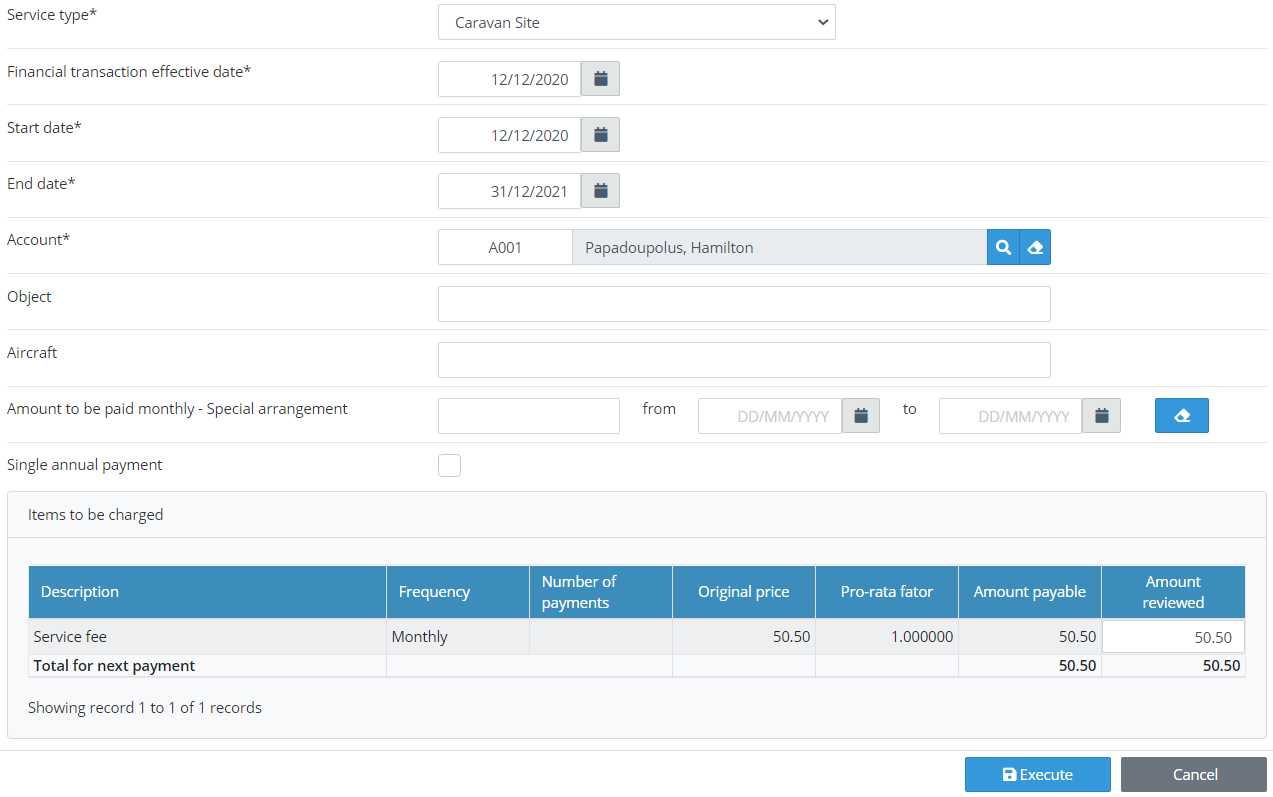
Service type
Select the new contractual service you are creating for the member. For renewals, this field is populated by the system and cannot be modified.
Financial transaction effective date
Regardless the date in which you are creating or renewing the service and the dates to which the service term will apply, you can define the date for the charges applicable to this service. This is the date that will be shown in the statement for the charges or for the first monthly payment, if you the renewal frequency for this service is set to “Continuous“.
Start date
Start date for the contractual service.
End date
Date when the contract for that service expires. If it is to continue, then a renewal for that service must be made. If the renewal frequency for this service is set to “Continuous”, the expiry date should be set to 31/12/9999. In this case the service will only cease when it is cancelled.
Account
This is the account that will pay for the service. Usually this is the primary account of the same member to which the service is provided. The system allows, though, that a different account is defined as the paying account, regardless whom it belongs to.
Object
The object is a free text field where you should enter the subject to whom (or object to which) the service applies. If the object is an aircraft, there is a special field for this (see next field). If the subject is not an aircraft (caravan, club space, parking slot, etc.), enter its name or identification here.
Aircraft
If the service is associated to an aircraft, enter the its registration here.
Amount to be paid monthly – Special arrangement
If the agreement made with the member about the payment for the service is different from the standard set up in the system, you can make a special arrangement and tell the system the amount that should be collected monthly and for how long. The information entered in the special arrangement fields take precedence over any other payment information calculated by the system.
Single annual payment
Regardless the payment frequency set up in the system for a certain service, some members prefer to make a full, single annual payment for the service he/she has contracted. If this is the case, select the Single payment box. When this option is selected, the system calculates the annual amount and charges the member in a single payment. The system will then repeat the process every year. This single payment is taken always in January.
Items to be charged
This section of the screen shows the items that will be charged for the service alongside their respective values and payment frequency.
Why Aerolog Cloud?