en1020020_ChartOfAccounts

Chart of Accounts
The chart of accounts, also called “The Ledger”, is the baseline of its financial module. It provides the source of information or reference to which all financial transactions must point to.
Although it is called chart of accounts, its function resembles a list of analysis codes. Ledger accounts do not hold balances. All services and goods sold by the organization are linked to a ledger account. Whenever a financial transaction is created, its corresponding ledger account is automatically attached to it. As a consequence, all financial transactions contain information about the ledger account they are linked to.
Aerolog Cloud is delivered with a standard chart of accounts. You can create new accounts or remove accounts that you do not need. This chart of accounts covers most, if not all, cases and scenarios of any typical aero-club, gliding club or flying school. You may not need to change it at all.
By scanning all financial transactions for a given period, the system can report on ledger account figures associated to services provided or goods sold, over that period.
The ledger has two types of accounts: Summary accounts and detail accounts.
Summary accounts (or parent accounts) are used uniquely to group together other accounts (child accounts). Summary accounts cannot be directly associated to any financial transaction.
Detail accounts (or child accounts) can be associated to financial transactions. Detail accounts are always subordinated to one summary account (parent). This, in turn, can be subordinated to yet another parent account at a higher level.
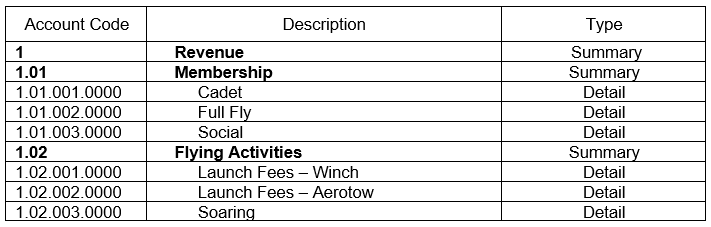
There is no requirement of a predefined structure of the chart of accounts. For clarity and organization purposes, it is advised that the chart of accounts follows the structured suggested here, as it makes the chart clear and concise.
Aerolog Cloud chart of accounts has a peculiarity: They do not have a current “balance” field as we can find in most ledger accounts of accounting packages.
As the purpose of this ledger is to provide a classification for the various accounts and have their figures exported to the relevant accounting package adopted by the client, the balance does not have relevance.
In this context, it is the amount of revenue generated by items associated to each ledger account in a given period that matters. This figure is evaluated instantly, whenever a query is made.
This characteristic gives the user plenty of flexibility in terms of financial inquiries, which can be made at any time and over any period. It also removes the need for special end of year procedures, which certainly is already covered by your accounting package.
Great importance should be given to the definition of the chart of accounts. A complete and comprehensive set of accounts allows you to organize and easily access information regarding the revenue generated by the organization on its various different areas.
Many of the financial reports display information based on the ledger accounts that have been defined. There is no harm if your ledger has some accounts that are not used. The reports will only display accounts for which there have been movements during the period being inquired.
To allow for easy interaction with your accounting application, you can define, for each account on Aerolog Cloud‘s ledger, the code of your external ledger account. In this way, when Aerolog Cloud generates the financial export file for your accounting application this will already contain the relevant ledger account code for the external accounting system.
The structure of codes on Aerolog Cloud‘s chart of accounts is as indicated in the image that follows:
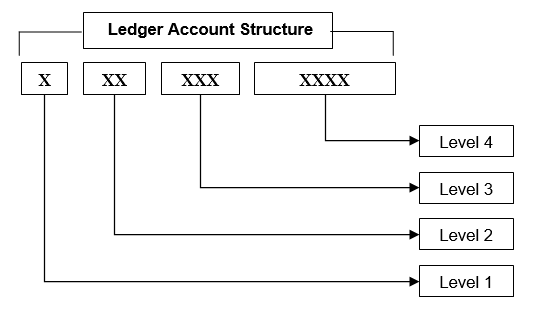
Level 1 – One character. Identifies one of the five main accounting groups (Revenue, Expenditure, Assets, Liability and Capital).
You can allocate any number to level 1, except ‘8’ and ‘9’, which are reserved for internal system’s use.
Aerolog Cloud accounting codes are set up as standard using the following convention:
- Revenue
- Expenditure
- Assets
- Liability
- Capital
Level 2 – Two digits. Identifies sub divisions within Level 1. You can use any number from 00 to 99.
Level 3 – Three digits. Identifies sub divisions within Level 2. You can use any number from 000 to 999.
Level 4 – Four digits. Identifies sub divisions within Level 3. You can use any number from 0000 to 9999, alphabetic characters (A to Z) or a combination of both.
If you do not need to make use of a certain level, leave it and all its subsequent levels as blank.
It is important that you analyze you chart of accounts and make sure it reflects the needs of your organization before you start to create financial transactions.
Aerolog Cloud is supplied with a comprehensive chart of accounts which is likely to cover all needs of your organization. All standard services are also already set up and associated to their respective ledger accounts. With a minimum of adjustments (or even none at all) you will be able to start using its financial structure straight away.
 If you need to change ledger codes, the system allows you to do so. However, please maintain the codes compatible with the structure in which it is contained. Technically, the system is not affected if the ledger code does not follow the structure of the chart. However, the visualization of the chart of accounts and its immediate understanding by the user would become rather impaired.
Why Aerolog Cloud?